Architecture
Why Every Build Needs a Blueprint
AI can write code. But it can’t decide what to build.
That’s your job. And it starts with architecture.
Before You Build Anything, Read This
Imagine you want to build a house. You’re excited. You’ve been thinking about it for months. You call up a builder and say, “Let’s go. Start pouring the foundation.”
The builder asks, “How many bedrooms?”
You say, “I don’t know yet. Let’s just start and figure it out.”
The builder asks, “One story or two?”
You say, “Probably one. Maybe two. Let’s see how it goes.”
The builder asks, “Pool?”
You say, “Maybe later.”
So the builder shrugs, pours a foundation for a basic one-story house, and starts framing walls. A few weeks in, you decide you actually want a second floor. And a pool. And a big open kitchen instead of the small one they framed.
What happens next?
The foundation isn’t strong enough for two stories. It has to be ripped out and redone. The plumbing wasn’t routed for a pool. The walls are in the wrong places for an open kitchen. Every change means tearing something apart that was already built. The cost doubles. The timeline triples. And the final house? It’s never quite as good as it would have been if you’d planned for all of this from the start. The seams show. The fixes are awkward. It works, but it’s held together with compromises.
This is exactly what happens when you build software without architecture.
What Is Architecture?
Architecture is your plan. It’s the full picture of what you’re building, decided before you start building it.
It means sitting down and answering questions like:
What does this app actually do? (When we say “app” in this book, we mean any piece of software you’re building whether it’s a website, a mobile app, a tool, a dashboard, anything.) All of it, not just the first feature I’m excited about.
Who uses it and what do they need to do?
What are all the major pieces, and how do they connect?
What might I want to add later?
When you answer these questions up front, you give AI something incredibly powerful: the full picture. And when AI has the full picture, it builds things completely differently than when it’s guessing.
Think about the house again. When an architect knows from day one that the house will be two stories with a pool, they design the foundation to handle the weight. They route the plumbing for the pool before the concrete is poured. They place the staircase where it makes sense for the whole layout, not just the first floor.
Nothing has to be ripped out later. Nothing is awkward. Everything fits because everything was planned to fit.
Software architecture works in a very similar way.
Why AI Specifically Needs This From You
Here’s something important to understand about AI: it does what you ask. If you ask for one thing, it builds one thing. It doesn’t look ahead. It doesn’t wonder what you’ll want next month. It doesn’t plan for features you haven’t mentioned. 1
If you say “build me a simple task list,” it builds a simple task list. Later, when you say “now add user accounts and team collaboration,” AI has a problem. The simple task list wasn’t built to support users. It wasn’t built for teams. Adding those things now means rewriting or patching most of what was already built. Patching logic slowly leads to spaghetti code2
But if you say up front, “I’m building a task management app where users have accounts, can create projects, and collaborate with team members. Here are all the features I need…”—now AI can plan the structure from the beginning. It builds the foundation to support everything, even the pieces you haven’t asked it to build yet.
You are the architect. AI is the builder. And just like a real builder, AI does its best work when it has a complete blueprint.
A Peek Under the Hood
You don’t need to write code. You don’t need to learn a programming language. But it helps to understand, at a basic level, what AI is actually creating when it builds your app. Not so you can do it yourself—so you can understand why architecture matters so much.
When AI writes code for your app, depending on the coding language being used, the following fundamental concepts are common. Think of them like the materials a builder uses to construct a house. Computer geeks can debate the nuances of each programming paradigm forever, but here is an overly simplified short list to understand: Classes and Objects, Functions, Variables.
The simplest way to understand these building blocks: variables and objects are nouns. Functions are verbs. Classes are templates.
Variables: Information the Software Remembers
A variable is a piece of information. It just sits there. It doesn’t do anything. It’s a fact that the software needs to remember.
Think of a sticky note on your fridge. One note says “Milk: 2 gallons.” Another says “Dentist appointment: Tuesday.” Each sticky note holds one piece of information with a label so you can find it later.
In software, a variable works the same way. There’s a variable labeled “user name” that holds “Sarah.” There’s one labeled “task count” that holds the number 7. One labeled “logged in” that holds “yes” or “no.” The software needs to remember things or attributes, and each thing gets stored in its own variable.
Variables are nouns. They’re the information—your name, your balance, your password, a task’s due date. They don’t do anything on their own. They just hold data.
Functions: Actions That Do Things
A function is an action. It takes information (input parameters), does something with it, and produces a result (function return).
Think about pouring a glass of milk. You go to the fridge, grab the milk (that’s a variable—just information sitting there), pour it into a glass, and now you have a glass of milk. The pouring is the function. The milk was the variable. The result is a glass full of milk.
In software, a function called “add task” takes the text you typed (a variable), creates a new task, and puts it on your list. A function called “send notification” takes a message and a user’s email (both variables) and delivers the message. Each function does one specific job, and it does that job every time that function is called.
Functions are verbs. They’re the actions—log in, send a message, calculate a total, delete a task. They make things happen. Functions, well, they make things function.
Objects: A Person, Place, or Thing in Your App
An object bundles related variables and functions together into one package. It’s a way of saying “these things belong together because they’re all about the same thing.”
Think of a contact card in your phone. It has information: name, phone number, email, address. Those are variables. And it has actions you can take: call this person, text this person, email this person. Those are functions. The contact card bundles all of that together into one neat package. That’s an object.
In software, a “User” object holds the user’s name, email, and password (variables), along with actions like “log in” and “log out” (functions). A “Task” object holds the task’s title, due date, and status (variables), along with actions like “mark as complete” and “assign to someone” (functions).
Objects are nouns with superpowers. They’re not just information—they’re a complete package of everything related to one thing in your app.
Classes: Templates for Making Objects
A class is a template that tells the software how to create objects. It’s the master plan that says, “Every user will have a name, an email, a password, and the ability to log in and log out.”
Think of a blank contact card template in your phone. The template says every contact will have a name field, a phone number field, and an email field. The template itself isn’t a person. But every time you add a new contact, your phone uses that template to create a new contact card filled in with that specific person’s information.
Classes work the same way. The “User” class is the template. It says every user gets a name, email, password, and the ability to log in and out. When Sarah signs up, the software uses that class to create a Sarah object. When Mike signs up, it uses the same class to create a Mike object. Same template, different information.
Quick recap of the building blocks:
Variables = nouns. Information the software remembers (a name, a date, a price).
Functions = verbs. Actions the software performs (send a message, add a task, calculate a total).
Objects = nouns with superpowers. A package of related variables and functions (a User with a name, email, and the ability to log in). An object is also known as an instance of a specific class.
Classes = templates. The master plan for creating objects (the blueprint that says what every User looks like).
Why These Building Blocks Need Architecture
Now here’s where it all connects.
When AI builds your app, it creates classes, objects, functions, and variables. Lots of them. And all of these pieces need to talk to each other.
The User class needs to connect to the Task class, because users own tasks. The Task class needs to connect to the Notification function, because when a task is assigned, someone needs to be notified. The Notification function needs to know about the User’s email variable, because that’s where the notification goes.
When AI knows the full architecture up front—all the features, all the connections, all the pieces—it builds each class with exactly the right functions and variables to talk to the other classes properly. It’s like the architect designing the house so that the plumbing connects the kitchen to the water heater to the bathroom. Everything is routed correctly from the start.
But when AI doesn’t know the full picture? It builds each piece in isolation. The User class doesn’t know it will eventually need to connect to notifications. The Task class doesn’t know it will need to connect to a calendar. So when you try to add those features later, the pieces don’t fit together. The connections weren’t planned for. The plumbing wasn’t routed.
This is why you end up with code that works at first but breaks when you try to grow it. It’s not that AI wrote bad code. It’s that AI built a one-story house and you’re now trying to add a second floor to a foundation that was never designed for one.
How to Think Like an Architect
You don’t need to draw diagrams or learn software design tools. You just need to do one thing before you start building:
Describe the whole thing.
Before you ask AI to build a single feature, write out everything your app needs to do. Not in technical language. In plain, human language. Here’s a simple process:
Step 1: List Every Feature
Write down every single thing your app should do. Don’t worry about order. Don’t worry about what’s hard or easy. Just get it all on paper.
“Users can create accounts. Users can post recipes. Users can upload photos. Users can search for recipes. Users can save favorites. Users can follow other users. Users get notified when someone they follow posts a new recipe.”
Step 2: Think About What Connects to What
Look at your list and ask: which features need to know about each other?
Notifications need to know about users and recipes. Search needs to know about recipes. Favorites need to know about users and recipes. Following needs to know about users.
You don’t need to get this perfect. You just need to think about it. The act of thinking about connections is what turns a feature list into an architecture.
Step 3: Think About the Future
Ask yourself: what might I want to add in six months? A comment system? A rating system? A way to share recipes outside the app?
You don’t need to build those now. But mentioning them to AI when you describe your architecture means it will build the foundation to support them. The plumbing gets routed even if you haven’t installed the pool yet.
Step 4: Give AI the Full Picture
When you’re ready to start building, don’t begin with “build the login page.” Begin with:
Ask AI
“Here’s the complete app I’m building. It does [everything from your list: item 1, 2, 3, etc…]. These features connect in these ways. In the future, I might also add [future ideas]. Now, let’s start by building [first feature].”
Number every task you're asking AI to plan for. This way the AI can generate an enumerated development plan and present it to you. If any task is missing from the plan, you can add it. If there are order of preference in the organization of the logics in the plan, you can adjust accordingly.
A detailed, well-organized prompt allows AI to perform tasks similar to the beginning phases of the traditional software development process: Ideation, Planning, and Iterative Construction. AI now has the blueprint. When it builds the login system, it will structure it to support everything else you’ve described. When it builds the recipe system, it will include the hooks that notifications and search will need later.
You gave AI the architecture. Now it can build with the right foundation.
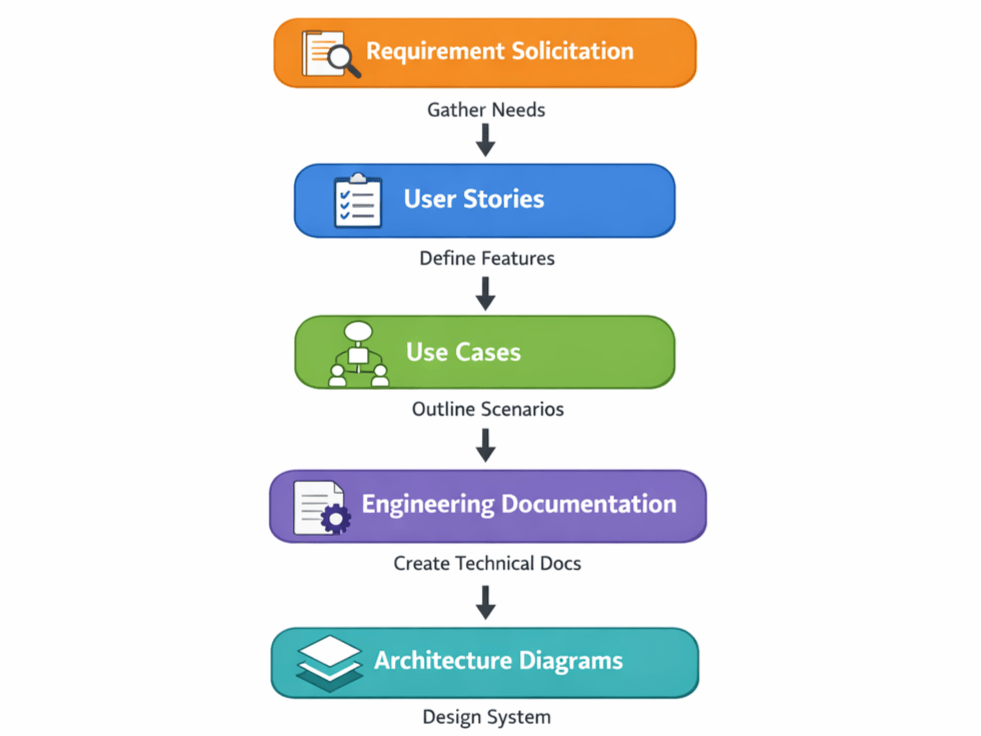
Note: Agile Software Development methodology is used in some form in most companies in modern software development. The steps above attempt to simplify the process and adapts it for AI assisted software development with limited manpower. Below is an example of the typical steps to take prior to Architecture design.
Figure 1: From Requirements to Architecture. These steps follow the same principles used in professional software development. The industry calls it Agile, but the idea is simple: figure out what you're building, make a plan, then build it piece by piece. Resolve the ambiguities before you start coding. Get clear on the details before AI writes a single line. This avoids wasted effort from rework and miscommunication later.
What Happens Without Architecture
Let’s make this concrete. Here are three things that go wrong when you build without a plan:
The rewrite problem. You build the first three features. They work great. Then feature four needs to connect to feature one in a way that feature one wasn’t built for. Now you have to rewrite feature one. But feature two was built on top of feature one, so that breaks too. You’re rebuilding everything from scratch. All that early progress? Wasted.
The spaghetti problem. Without a plan, AI stuffs everything together. The code that handles user login gets mixed with the code that displays tasks. The code that sends notifications gets tangled with the code that saves data. When one thing breaks, everything breaks, and nobody can tell where the problem is. Software engineers call this “spaghetti code” because everything is tangled like a bowl of noodles.
The “it can’t do that” problem. You want to add a feature, but the existing structure literally can’t support it. It’s like trying to add a basement to a house that’s already built. Technically possible, but so expensive and painful that most people give up and live without it. In software, this is how apps get stuck—they can never grow beyond what they were originally built to do.
Seeing It in Action
Let’s look at three examples of how giving AI architecture changes the outcome. Each one shows what most people do versus what an architect does.
Example 1
The Goal: A personal reading list app where you can track books you want to read and books you’ve finished.
Without architecture: “Build me an app where I can add books to a reading list and mark them as read.”
AI builds a simple list. It works. But the books are just titles in a list—no structure for author, genre, rating, or notes. When you later ask for “show me all the mystery books I’ve read this year,” AI has to rebuild the whole thing because it didn’t know books needed those details.
With architecture:
“I’m building a personal reading tracker. 1. Each book should have a title, author, genre, a status (want to read, reading, finished), an optional rating, and optional notes. 2. I want to be able to filter by genre and status. 3. see reading stats like how many books I’ve finished this year. In the future, I might add a way to share my reading list with friends. Let’s start with the ability to add a book with all its details. Create an implementation plan and allow me to review it and make corrections and adjustments before proceeding with coding.”
Why this works: AI now knows a book isn’t just a title—it’s an object with multiple pieces of information. It builds the Book class with all the right variables from the start. When you ask for filtering and stats later, everything is already structured to support it.
Note: As of early 2026, the latest version of AI integrated IDEs such Cursor, Microsoft Copilot, OpenAI Codex, or Google Antigravity may automatically generate an implementation plan to capture your requirements and provide a short description of the steps and components to be built. It will not start building the codes until you have a chance to look over the plan and approve.
Example 2
The Goal: A small business appointment booking app where customers can book services, pick a time slot, and get confirmations.
Without architecture:
“Build me a booking app where customers can schedule appointments.”
AI builds a basic calendar with time slots. But it doesn’t know about different services with different durations. It doesn’t know about multiple staff members. It doesn’t know about confirmation emails. Each time you add one of these, major parts of the system have to be rebuilt. The calendar that worked for generic 30-minute slots can’t handle a 90-minute service without breaking.
With architecture:
“I’m building a booking system for a salon. There are multiple services (haircut—30 min, color—90 min, styling—45 min). There are three stylists, each with their own schedule. Customers book a specific service with a specific stylist. The system blocks out the right amount of time based on the service. Customers get a confirmation email and a reminder 24 hours before. I might add online payment and a rebooking feature later. Let’s start with setting up the services and stylist schedules.”
Why this works: AI now knows that appointments are not all the same length. It knows that stylists have individual schedules. It knows that services and stylists and time slots are all connected. So it builds the Service class, the Stylist class, and the Appointment class to all talk to each other properly. The confirmation email function knows which appointment to reference. The schedule knows how to block the right amount of time. Everything connects because everything was planned.
Example 3
The Goal: A marketplace app where local artists can list handmade products, buyers can browse and purchase them, and both sides can message each other.
Without architecture: “Build me a marketplace where people can buy and sell handmade goods.”
AI builds a product listing page. It works for browsing. But it has no concept of a seller versus a buyer. When you ask for messaging, AI doesn’t know how to connect a message to a product or a transaction. When you ask for order tracking, there’s no order system to track. Every new feature requires massive rework because the core structure wasn’t designed for a real marketplace.
With architecture: “I’m building a local artist marketplace. There are two types of users: sellers (artists) and buyers. Sellers can create a shop profile, list products with photos, descriptions, prices, and categories. Buyers can browse products, filter by category, add items to a cart, and check out. After purchase, the order is tracked with statuses: confirmed, shipped, delivered. Buyers and sellers can message each other about a specific product or order. Sellers have a dashboard showing their listings, active orders, and earnings. I might add reviews, featured listings, and a promotional system later. Let’s start by building the user system with seller and buyer roles.”
Why this works: AI now understands the entire ecosystem. It builds the User class with a role variable (seller or buyer). It builds the Product class knowing it will connect to the Shop class, the Cart class, and the Order class. It builds the Message class knowing it needs to reference both a user and either a product or an order. Every class is designed with the right functions and variables to connect to everything else. Six months from now, when you want to add reviews, AI knows exactly where they attach—to a Product and a Buyer—because the architecture already accounted for that relationship.
Chapter Recap
Architecture is the plan for your entire application, created before you start building.
It’s the most important thing you can give AI because it changes how AI builds everything. With a full picture, AI creates structured, connected code where all the pieces fit together. Without it, AI builds isolated pieces that don’t connect well and have to be torn apart later.
Here’s what to remember:
Plan first, build second. List out everything your app needs to do before you ask AI to build any of it.
Think about connections. Which features need to know about each other? Tell AI about those relationships.
Think about the future. Mention what you might add later so AI builds a foundation that can support it.
Give AI the full picture. Start every project by describing the complete app, then tell AI which piece to build first.
Understand the building blocks. Software is built from variables, functions, objects, and classes. Architecture is how you make sure those pieces are designed to work together.
You are the architect. AI is the builder. A great builder with a bad blueprint will build a bad house. A great builder with a great blueprint will build exactly what you envisioned.
Give AI the blueprint.
Next up: Chapter 3—Problem Decomposition. Now that you know why you need a plan, you’ll learn the skill of breaking that plan into small, clear, buildable pieces—the key to getting the best possible results from AI every single time you use it.
Want the rest?
The full book covers how software works under the hood and what makes it easy to use.
Get the book →